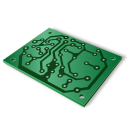
stardance has been extended another month! the new deadline is october 31 :)

You are browsing as a guest. Sign up (or log in) to start making projects!

EngThi

@EngThi

Joined June 1st, 2026

  • 75Devlogs
  • 3Projects
  • 1Ships
  • 21Votes
Open comments for this post

31m 52s logged

I just finished redoing the parts of the case the parts there and everything else in the project after this second round.

This last one that was missing was from Part Studio 4 , which was the little slider drawer for camera privacy and protection on the back 🔒 , along with Part Studio 5 where I made the sliding lid/cover. Very, very simple.

I also added some small slots there just to give it a nice tactile texture/grip — pretty small, with a 0.350 mm cut extrusion (removing material). That was kind of the piece I was still missing. It was simple and quick since I already had the basic idea from earlier attempts.

Oh, and one thing I think I forgot to mention before: I imported .DXF files into the sketch to help guide the drawings, basically defining the extrusions for the parts. It turned out pretty good!

To wrap up, I added what I had forgotten before: the mounting holes on the back cover bosses. Put 1.6mm holes there to hold the screws properly ⚙️ .

0
0
23
Open comments for this post

1h 12m 4s logged

For now I’m working on the CAD :onshape: ; I had finished the PCB. I put up a quick video of how it turned out I recorded it with Canva, which I’d used before for a school project, and it works. I even have the Spectacle app for Linux :linux: , but it records in 720p, which looks kind of bad, so recording it online through Canva ends up looking way better.

Basically, it has the dimensions of part two, which I was rethinking and everything. And well, this was more or less the idea I had: there’s the front part for the buttons, and in this other version, it was supposed to have a passage for a circuit board to fit a small solar cell ☀️ .

Depending on what I can find around the house and if there’s any leftover space in the casing (it’s pretty much ready), I might implement it even if it ends up mounted on the outside rather than inside the case, just for reuse and photovoltaic charging.

Then I also put the back part together: the little hole for the camera 📷 , the slider for its protection, and on the side, the microSD card slot.

The keymat for the buttons which I changed the layout of, so it’s not square anymore now has roughly the positions for all 49 keys and the holes where the support bosses will go. There’s also that little strip/rectangle, which is meant to be the protective cover fitting right into the other slot.

Basically, that’s it! I’ll continue and tweak it later. It’s not too difficult, and I think it’ll be finished soon.

0
0
19
Open comments for this post

57m 39s logged

It’s kind of funny that I messed with this again, but basically this is a version where I repositioned the buttons and pins because, well, I decided the keys aren’t going to stay as a plain square matrix.

So I kind of organized and divided things there to get a better idea of how the pins will be placed roughly around the center. On the top part, there’s sort of that D-pad area (not an actual single pad, but the individual buttons for that navigation). That circular button style you see on game controllers, handhelds :blobby-video_game: , and on some other calculators too.

I also moved the FPC connector over to the corner so it’s way easier and cleaner to connect everything up :work: . On top of that, I rounded the board edges in this version. Overall, that was pretty much it!


Lapse:
Lapse :lapse:

0
0
54
Open comments for this post

44m 1s logged

Keypad PCB done! Top & Bottom preview :pcb:

Now that I’ve finished, I’ve completed the PCB both images, the top and the bottom. I left the spaces for the M2 screws and already rotated everything, it was pretty easy! :check:

Basically, I kind of left an array, a 7x7 matrix :matrix: . The keys would be more or less standardized and the only difference would be in the pad — like, in the rubber, the material that you press to trigger that key. That kind of thing.

It turned out pretty nice. It’s simple, it’s actually simple to do this part, this kind of thing… That’s how it turned out.


I’m not sure if I’ll tweak it much to add things like a D-pad or other types of keys for navigation, functions, the numeric keypad itself :digit-calculator: , that kind of stuff.

0
0
24
Open comments for this post

1h 57m 33s logged

I’m back! Finalized the second PCB for the keys :pcb:

Well, yeah, I’m here again. I’m back, it’s been a while since I was away, right? I waited for things to settle down here so I could continue with the project.

Yeah, and I finalized the idea of making a board on the second PCB :pcb: there, where the buttons will be, you know, the clicks to use the calculator keys :digit-calculator:. And this here was kind of leftover code organization I was doing in the repository :repository:. I ended up not remembering everything from the project, but now I’m here again. So I’ll finish this up. It was pretty simple, I didn’t record it.
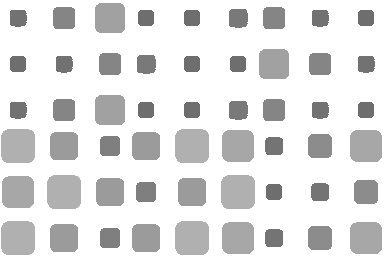
But basically, I made a 7x7 matrix of switches :matrix-loader:, the buttons. Along with that, there’s the FPC connector to actually connect the board to the ribbon, to the rest of the MCP expander. I’m going to tidy it up a bit.
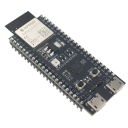
The board also ended up being quite small 84x78 basically just to fit there, it would provide support and, you know, fit the switches at the distances that had already been predetermined in the case, right in the middle of the product’s housing.

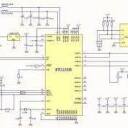
And then, along with that, the schematic is also simple, I just put an FPC connector, that’s all that’s really needed, and the buttons, the switches. Really simple. :check:


I think it’s interesting to mention (diodes & debounce):

I was also going to use, you know, I was looking, people were saying, it’s good to use diodes, but just to kind of reduce debounce, fix certain issues, but it wouldn’t be that necessary, since the contacts closing would almost never happen like, I don’t know, three clicks at once, one next to the other.

So that doesn’t really cause a problem where the ESP :esp32-s3: wouldn’t know exactly which key is being pressed and what it should do with the signal it’s receiving. And depending on how you study it and see how to handle it in the firmware, it actually wouldn’t even be that necessary to put these diodes on each of these buttons for that.

0
0
24
Open comments for this post

1h 52m 44s logged

almost ready to submit!!!

Finished and I’m getting ready to submit the project for review! I took some new renders and also did the prices part for the project items. I have everything here now and it is looking nice.

Like I said before, I left some points to see and change better on the case when I have everything in my hands, so I can prototype 🤖 it better. :work:

I don’t have much skill with soldering, so I really hope I can get the Top PCBA. This is all really cool and interesting that I was able to do, and I’m really happy about it.

At the end I also organized things a little more and changed stuff to track what is needed in the repo :repository:, help anyone that wants to look at it or reproduce the project somehow. The
System architecture section got really cool in the translation and organization, AI did that. I don’t really know how to make this type of diagram myself yet :/

I hope I didn’t forget anything and that the organization I made, and later asked to improve, documents the state well.


Basically I:

I finished organizing the repo, checking the prices, calculations, etc., taking screenshots :print-screen-sysrq:, I kept iterating in the repo, editing, moving things, that kind of organization 🗂️

0
0
10
Open comments for this post

38m 31s logged

more docs things right these


Well, I tidied up the README and organized the folders and file names better. The repo in general :repository:.

The other image is because I think I didn’t show it properly here and I was reposting, checking items and analyzing anything :check: left there on EasyEDA

0
0
11
Open comments for this post

1h 13m 11s logged

its possible only four images…

I fiddled a bit more with these items, files 📁 , repo :github: organization :organization:, stuff like that :markdown: . Also, I took screenshots of some views from the project’s mechanical render…
I’m not really focusing on any one part, but I tinker a bit here and if I remember something I should have done or think could be better, I take care of it. Like parts of the firmware, code, repo organization, images, and the internal side of the apps: CAD and EDA. Basically, that’s it, to sum up.

I forgot to put the others Lapse

0
0
44
Open comments for this post

1h 12m 29s logged

I’m done here! The two files we worked on are finished.

Now we have the initializer and use of the MCP23017 (I’ll just write MCP from now on in this log). The addresses have been mapped and the registers too. You can see what happens along with the logic of keeping the line in the LOW state and the rest HIGH. In this part, it’s necessary to use masks and bitwise operations to see how it works. It stays in a loop analyzing what was pressed and, of course, if something strange happens outside the configuration, it throws an error saying UNKNOWN.

0
0
8
Open comments for this post

1h 25m 6s logged

I made a lot more progress on the firmware!! :yay:

As I said, the functions, declarations, and general use of the ESP-IDF are standardized, so it’s simple to build by consulting materials: docs, example codes, usage with some peripherals and components, AI, etc.

In this case, the use of I2C :i2c-bus: and SPI communication is also well organized. The drivers for the components I use don’t give you headaches for this.


Previously, we had already been working on the ‘macros’ part, or rather the project HAL, even without knowing what it was. In the second image, there’s the keymap, made as a 7x7 matrix :matrix-loader: for the calculator - what the keys do. That’s already connected to the names of each key. The scanning was done, a loop that identifies which keys were used, and the rendering of the items on the display :digit-calculator: . Taking the data buffers and transitioning the communication with the ESP about what was pressed and how it will relay that to the screen.

I think it’s interesting to mention:

Explaining how key reading works with the MCP: each key is assigned by the matrix indices - row x column. The columns are set up with internal pull-up resistors, so when inactive they measure 3.3V (level 1). The ESP pulls the row to 0V (level 0), and when a key is pressed, it knows it because it reads !=0 from the column and matches it with the row it’s accessing to get the unique identifier for that key. That way you know 100% for sure what was pressed. And this cycle keeps running every few milliseconds.

0
0
9
Open comments for this post

41m 56s logged

I got started at the base and analyzed the HAL (Hardware Abstraction Layer) of the project. I was studying some things, basically the functions and how to use the framework. I noticed that the functions are pretty standardized, like how to use registers, handle addressing, and use macros, directives/variables.

Basically, the headers I was going to use and docs and things like that I was checking out, now speaking exclusively about the Aliexpress :pet-aliexpress: display that was in Mandarin (some of the ones I saw while researching) and offline I was tinkering and looking at some things, asking AI :codex: to explain and check things to move forward. I got the variant I was going to use, and later on it got analyzed and the board_pins.h ended up fine.


I also started messing with the keypad, just defining it and later on how to monitor and use the identifiers of each key :key-blank:.

0
0
3
Open comments for this post

54m 2s logged

I started looking more closely at the firmware :c: part! Actually, I’ve never worked with ESP-IDF, :esp32: so I’m going to take another good look at it and refresh myself on things I might not be prepared enough for.
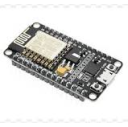

I grabbed it to check out and study with the example code "Blynk Led" :blobby-bulb: —the one in the picture is a different one. It’s to control the internal LED with the BOOT button.

I’ve seen a bit, and RTOS seems really cool, here it’s FreeRTOS. But you need to pay attention and be aware, understand how things work. I feel like it’s going to be a long and tough road… but let’s go! The good thing is that we have AI to help us out and clarify points, test stuff, and so on.

0
0
66
Open comments for this post

41m 33s logged

I finished working on a few more things in the Assembly. I was aligning the cut positions in the view (remove extrude) and it took a while because the Mates, Fastened Mates created kind of restrictions that didn’t allow certain parts to move. Also put the 3D for the display. Then at the end I made the first commit to the repo! :github:


Lapse

0
0
9
Open comments for this post

1h 43m 30s logged

I just tweaked the parts a little more :work: and then went to the Assembly :onshape: . The PCB step was 50MB and took a while to load, and then when I tried to insert it, it didn’t load everything right after choosing a square option with a symbol similar to the Part Studio one, but eventually it worked. I used some fastened mates to join the items, and since this isn’t constant and there are hollow parts where you want to center/place in a specific spot, the Mate Connector doesn’t apply, so I used something like the transform to select the piece. That’s how I kept going until I got here! In the middle of the work, I had to edit the Part Studio because some points differed from the positioning and mounted parts of the PCB, like the USB and microSD.

That’s it—work, found mistakes, fix them, and move forward! :keep-going:


Lapse

0
0
11
Open comments for this post

39m 1s logged

What happened with the keypad being wrong was that in the sketch I dimensioned it incorrectly (swapped height for width), and that’s why some of the blocks went beyond the edges and weren’t symmetrical. I imagined that might be it and fixed it. I made a rectangle there thinking about maybe adding a simple lens protection for the camera. After that, a rough idea of the cover that is usually used to protect the front part. Besides that, just a simple fillet on the sides. I did that, but I admit I might change this idea and its overall shape. Once I have everything in hand, I’ll update it to have a proper enclosure.


Lapse

0
0
5
Open comments for this post

1h 11m 1s logged

I finished the rear shell for the case. I made some bosses for the PCB fitting. It’s noticeable that the top right one is misaligned. I mentioned before that it’s because the traces and components were occupying that space, and when I remodeled it to 84x85, the hole slots didn’t go along—they got lost on the canvas. Later I remembered, organized, and figured out a way to put them like this. Only one ended up 'strange,' which is NOT a problem at all.
I made the shell 1.8mm thick and also cut the slot for the camera.
I left the keypad at 74x80, making a 7x7 feature pattern. This still bugs me because it doesn’t look right and the logic seems to change… I just need more experience and general practice to be ready for different scenarios. Some parts went out of place, but it’s just a matter of testing measurements until it works and maybe checking some guide videos on how to use this feature correctly.


Lapse

0
0
13
Open comments for this post

1h 52m 2s logged

I had made a Variable Studio but I end up not using it and don’t remember much. I asked the AI for help since I’ve never really worked with this item and it seemed better for standardizing and putting something defined that is used constantly. But in the end, I remember the quota values and some calculations are simple. Here I did the rear and front parts of the case, I didn’t do the extrusion there but it’s more or less correct. I had been thinking, and as I said, I worked on an idea and previous version, so it was actually pretty easy for that.

0
0
6
Open comments for this post

1h 25m 37s logged

I finished placing the holes on the PCB. Actually, I had forgotten… I was focused on finishing and trying to deliver something more professional in the routing part that when I finished I was like "finally did it? Can I export the production files now?" and the happiness and rush of the moment made it happen.
It wasn’t possible to perfectly align the holes and the thought I had because of the traces I needed to place on the PCB, so it stayed like this. Only the top-right one ended up ‘different’.
Now it’s just finishing the PCB and fixing the firmware :code: . I was already checking and testing a bit offline.

0
0
3
Open comments for this post

3h 8m 57s logged

I routed a lot more! I tried, tried to optimize so I wouldn’t have to run traces on Inner1, but it really wasn’t going to work. Partly because of the layout and distances of some ICs to the decoupling capacitors, practices for better signal quality. I forgot (:no:) and it was already almost done, so I came here to post up to this point

Lapse:
Lapse :lapse:

0
0
6
Open comments for this post

3h 56m 24s logged

Well, what happened. I went to check the price of the PCB – in this case, when exporting the GERBER it showed a price and it was pretty expensive, $33! The other 3 boards I made were within the 100x100 size and, if I’m not mistaken, the most expensive one was listed at $7. Here I’m kind of making different versions and testing, experimenting with what happens with certain configurations (size, traces, layers, type of components, price,…). I was putting it off and taking my time because I wanted to use what I had from the other one, but then I decided to start routing from scratch.

0
0
5
Loading more…

Followers

Loading…