stardance has been extended another month! the new deadline is october 31 :)

You are browsing as a guest. Sign up (or log in) to start making projects!

BKpad

Hardware
  • 8 Devlogs
  • 42 Total hours

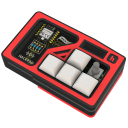
My very unique macropad designed on the BoyKisser model who can help you with tiping UwU, hmm and many things! It lets you cange your volume too :)

Open comments for this post

8h 28m 19s logged

Devlog 2 s2 !!! :blahaj-: (18 hours of work sorryyy)

This devlog is a software one :3

The story… :blahaj-witch:

KMK

I first flashed Circuit python, downloaded my project (which was done on KMK) onto the controller, and started the macropad.
Nothing worked :blahaj-head: (But really nothing, like I was the CEO of Nothing lol)

I then tested one other project’s KMK code, and the OLED worked :blahaj-scooter: (It was the only thing working)

I had to fall to lose it all, but in the end, it doesn’t even matter. (The framework’s functionalities weren’t working :tbh: )

KMK was trying to cycle in None :broken-fart: , and all the magical stuff they did was not working even though I did the things needed that the documentation wasn’t talking about.

QMK

I tried so hard and got so far, but in the end, it doesn’t even matter (The library was deprecacted and dead :tbh_blinking: )

I had to switch to QMK and it’s in C :blahaj-ghost: (Never wrote in C), leaving many hours of python work beside me TwT

To start, I needed a working basis to experiment on and implement my functionalities.
Thanks to :sparkling-blahaj-heart: Mediapad’s QMK source code :blahaj-heart: and my python KMK file, I asked AI to merge them.


:warn: I globally translated my python file to C, so the AI did not add any new functionalities :o !

With the basis I had, I first needed to flash my code :blahaj-headphones:

QMK compilation tool is too mysterious for me so I asked a last time VScode’s ai to make me a CMD script that compiles automatically. (I tried by hand before btw, with no success)

Then I stopped using of VScode’s AI. :tiedyeparrot:

I added many functionalities, and my Lumo AI was used only for the first debugs I had to do + one function but then only Brave search AI overview was used.

Here are all the functionalities I added: :blahaj-reading:

  • OwO UwU Oh Hm prints on your computer independently that if you are on QWERTY or AZERTY (you can toggle the parameter with a combo). Else, it would have just written UzU or OzO :blahaj-spining:

  • a combo that opens you BKball’s website (by typing win+R then the link then enter, it is very safe :3) And put the keypad into controller mode, made specifically for this precise game, while setting the pad’s color theme to automn :neocat-blahaj-dom:

  • a combo to enter bootloader mode (especially useful for me instead of opening the case to click a button of the controller whenever I change the code!) :matrixparrot:
  • each LED have its own color, and a smooth hand made non periodical animation make the pad more living :sparkling-blahaj-heart:
  • You can control the luminosity of the pad by turning the right potentiometer and your system volume using the left one (it even changes the OLED’s brighness even if it’s not very noticable)
  • when you click or turn a button, its red cheeks becomes brighter and his mouth expression changes :blahaj-scooter: ( 5 different images for the mouth, 2 for the AZERTY/QWERTY indicator and one for the Game Mode, all made in GIMP)
  • it stores the luminosity and pc layout between uses so you don’t get blind each time you boot it ip in the dark :blahaj-ghost-2:

Final words :blahaj-:

I am happy with how the project has gone and how I could make it a reality :o
If you wonder why I say 18 hours instead of the 9 written: I linked a 9 hour hackatime project after doing it and I hope the time didn’t vanished but I am really worried that I won’t have this time counted :(
Why did I waited this much?
I want to send a devlog with real new things, not just “I added a README”, I did add READMEs but it’s a normal thing to do and it wasn’t worth talking about, then I may have forgotten a bit :3 :hyper-blahaj-spining:

This devlog took me 4 days to write so thanks for reading! :blahaj-heart-67:

0
0
73
Open comments for this post

12h 50m 8s logged

Devlog 1 s2 :blahaj-:

This is my first “after-shipment MakeLog”, I am so happy to have my components that I actually forgot to devlog properly, so this one is for the physical build :blahaj-head:

What is the BKpad? :blahaj-reading:

This custom shaped macropad lets you write emojis, change your system volume, and is the best controller for BKball, my game :D

What did I do this time? :blahaj-witch:

I received all the pieces!!!
I now have:

  • the custom PCB :blabla:
  • all the pieces from the kit :hackpad:
  • The case (rip the lost one) :turtle-hdr:

With all that, I soldered the components, I tested the connections, I cut 0.5mm on each hole of the case, the translucent material is not very precise :3
I got to make the pcb go into the case then I soldered the keys.

I later had to make the inserts go in ! (don’t look to the 0.5mm not in the hole :blahaj-ghost-2: )

I had to resolder my first led and then everything was nice. It was super nice to have a “pro” soldering station (8898 JCD on aliexpress hehe).

Finally, I had to find a cable which could go in my case. Xiaomi cables are too big, some other wasn’t “data”. A no name one was good, so if I upgrade the design I will have to think about make more space inside :blahaj-scooter:

What’s next? :sparkling-blahaj-heart:

( I already did this but I prefer to cut the process in clear steps)
I will have to test the firmware, modify it, find it is deprecated then sell my soul to the demon :blahaj-shock:
Goodbye :D

0
0
29
Super Star

As a prize for your great work, look out for a bonus prize in the mail :)

Wow, this hackpad is extremely creative and very well implemented ! You chose a very unexpected source of inspiration, but pulled it off perfectly - proud to be able to approve this
UwU (niche reference ?) !

Hello!

This is an amazing project! However, you need to make sure that you are following the file structure for submitting a hackpad!

Your PCB folder should have all your KiCad files, your CAD folder should have a .step file of your hackpad case assembled, your Firmware folder should have all the code of your firmware, and the production folder should have the gerbers for your PCB, the parts for your case in seperate .step files, and the main.py of your firmware!

Once this is done, we will have another look and **hopefully**, you will get approved if everything is right!

P.S. I love the website that you made! :D

Open comments for this post

7h 51m 35s logged

Devlog 6 :blahaj-:

What is my project?

The BKpad is a small keyboard that let you emoji someone easily! You can also control your volume and luminosity by turning his ears

What was already done?

7 hours of hackatime:

Code :

I have done research and chose KMK software, a circuit python library (this is modular!)
Then I worked with Mu Editor :/, a circuit python ide (this app is designed too big)
I started to do the functions, see what pins were what component
It was hard, I didn’t understand the library and there was different things not well explained for my smol brain ;-;
I decided to switch to VScode :D, a more convenient ide where you see a lot more of your code easily
I added support for every component one by one :)
The code is messy BUT I think it works 👍

Website!

I need a presentation website. I think of it like a way to show to everyone and not just for the technical persons. This hardware project makes me learn a lot into technical, but it is not an HTML project so I tried something new… No-code options! (this is experimental and this is not good)
In less than 2 hour I have a beautiful website traduced in french and English by myself, responsive and good for normal people to see.
I used a solution named Odoo, 80% open source and free -> BKpad.odoo.com
(However, this is no great to do big websites, for one page it’s good but if you want to expand i’m not convinced)

GitHub!

I updated the readme.md:

  • I added new images placed in some tables
  • I added/updated explanations, how I made it in steps, the link to the website
  • I uploaded all the files needed and there are now in folders (it imported my gitignore Iol)
    -> PCB / CAD files / firmware

Fun facts:

My project is indexed on Google, if you search “BKpad github” it finds :)

Future actions:

Shipping ! I will ship my project, he is functional and can be produced, it have no problems in the PCB editor, tolerances for the box and all the files are on github!

Goodbye and thanks for reading!

0
0
48
Open comments for this post

4h 29m 15s logged

DEVLOG 5!!!!

What is my project?
This macro pad helps you with your social interactions by letting you control the volume or typing emojis with a single clic OwO

What’s new?

I designed the whole case, there is everything needed:

  • a hole for the cable
  • supports that the pcb don’t break while you press on it :)
  • light diffusions
  • hairs in 3d but easy to print :3-blahaj-spinning:
  • holes for all the parts
  • head elements like the noze :-)
  • decoration inside the box!! (you can’t see it when closed BUT it is cool :3)

You finished the case?

Yeah totally (I hope), now I need to program my little controller :)

I hope this devlog was good and not too long thanks for reading !

4
1
239
Open comments for this post

5h 9m 26s logged

HELLOWWW - Devlog 4

What is my project?

  • a macro board designed for social innteractions, inspired by the boykisser!

What is already done?

  • global design, choosing components
  • PCB design (with a custom shape, not just a rectangle)
  • Learned KiCad and Fusion360

What since the last devlog???

6 hours of work! not wasted :)

  • The components moved a little and I wired it, not just logically but definitively with the pencil
  • I ajusted the shape of the whole thing (it’s optimal now!)
  • I moved on fusion360 to make the case!
  • for this I did research, mental utilisation and google.com/How to copy paste fusion360
  • I needed to make another project with the pcb to save it and then only use it :o
  • Last steps I did: Make the boykisser shape, then cut the pcb into it with 0.20/0.25mm more than the original shape

I have now the shape !!!!! (I’m happy, took too much time and braincells)

what’s next?

Cutouts onto the box, and top of the box I think
I always move forward, even if I don’t know what to do, there is always one thing to do!!!

Thanks for reading :)

0
0
20
Open comments for this post

2h 3m 2s logged

# Devlog 3!!!

I firstly discovered the blueprint problem after one night of sleep :o

In Kicad I used the native SK6812MINI-E RGB LEDs blueprint instead of the one given by the hack club (now it works!)

In a second time, I ended up finishing my component choices!

  • 2 switches
  • 2 rotary encoders
  • 12 leds
  • 1 oled

Then: Design time!

I tried a first time to wire it all, two leds at the oposite are linked (this is not intentional) and i will be forced to use my brain to make them closer to each other :3
I swapped between designing on fusion360 and Kicad, at the right scale, to have my pcb under 100x100mm and try to see the shape I will use more precisely :)
You can see down there the design!

I had time to update my Github to make it more readable and more accurate to my actual design :thumb-sam:
I am discovering integrated emojis while typing this :o :blahaj-spin:

Now I plan to wire the components, use only the time laps in browser (the app don’t sync with my browser who go to sleep, RIP my 8gig laptop who is forced to use fusion360 on windows :o)
Yesterday (14 of July) was in France the national celebration. (additionally they lost against Spain but this is not my problem :)). I lost 2 hours looking at the strikers going on top of my house and the military on television in Paris UwU (didn’t recorded it as project time).

0
0
18
Open comments for this post

24m logged

Devlog!

I discovered at the moment that the time-laps counts in the whole time :o

I firstly discovered that I did not had enought pins to wire it all so i shrinked it up! I have now a new design with the right number of components!

I worked on my pad:

  • logically wired all my components
  • followed the instruction saying “This LED must match this blueprint” (it does not match :/)

Now I must find where is the problem with my LED socket then fusion360 will enter in my life a second time !

I also verified my identity with persona and I will think to update my github!
I try to upgrade the beauty of my devlog I hope this is good!

0
0
20
Open comments for this post

18m 31s logged

First devlog!
I firstly drown my idea on gimp, it seemed a really good idea so i started to work on it!

To start my project, I firstly looked at the tutorial. KiCad was nice to use, but fusion360 was just not usable for me (I only used tinkercad before). I watched a 21 minuts french video about making a lamp in this software (it really helped me just to know the commands :o).

Knowing I can use KiCad and Fusion360, I started the project, making this page, a github, a readme for it and worked on KiCad!
My repo github already received an issue for a typo and then a pull request named “make the project frenchier”, which I accepted (having a french flag in my repo is nice :3).
What I have now is all my components on Kicad, and I hope I can use the switches without the matrix system. I am now looking what pin can do what for the module.

I like very much this “beginner” project. I see this as hard but nevermind :)

0
0
25

Delete project?

Are you sure you want to permanently delete this project? This action cannot be undone.

All devlogs, followers, and associated data will be removed.

Followers

Loading…